
TikTok Ads Automation for Agencies
Run TikTok in the same dashboard as every channel you manage.
Another platform, another login, the same campaign rebuilt one more time. TikTok should not cost your team a whole new workflow. BuyerBridge’s TikTok ads automation puts it in the same dashboard as every other channel, so you build once, manage budgets in one place, and send a preview link instead of a screenshot.
Why Agencies Add TikTok for Their Clients
TikTok passed 1 billion monthly users worldwide in 2021, and many of your clients' customers already spend time there. Short video gets shared far more than static posts, and ad competition is still lighter than on Meta.
Six channels. One login.
- ✓Build and preview ads
- ✓Pace budgets
- ✓Catch alerts
- ✓Send reports
Adding TikTok for a client shouldn’t mean adding another login. With BuyerBridge, it’s one more channel in the dashboard you already use.
Why Agencies Use BuyerBridge for TikTok Ads Automation

Build Once, Launch Everywhere
Upload one creative, let BuyerBridge fit it to TikTok’s 9:16 size, and launch it to TikTok and your other channels in the same session.

Budgets That Pace Themselves
Set a monthly goal and auto-pacing adjusts TikTok daily budgets, capped at 20% a day so campaigns stay out of the learning phase.

Reports Under Your Brand
Running white label TikTok ads for clients? Send them white-label reports that put TikTok next to every other channel they run, with your logo on top.
Build a TikTok Ad Once and Preview It Everywhere
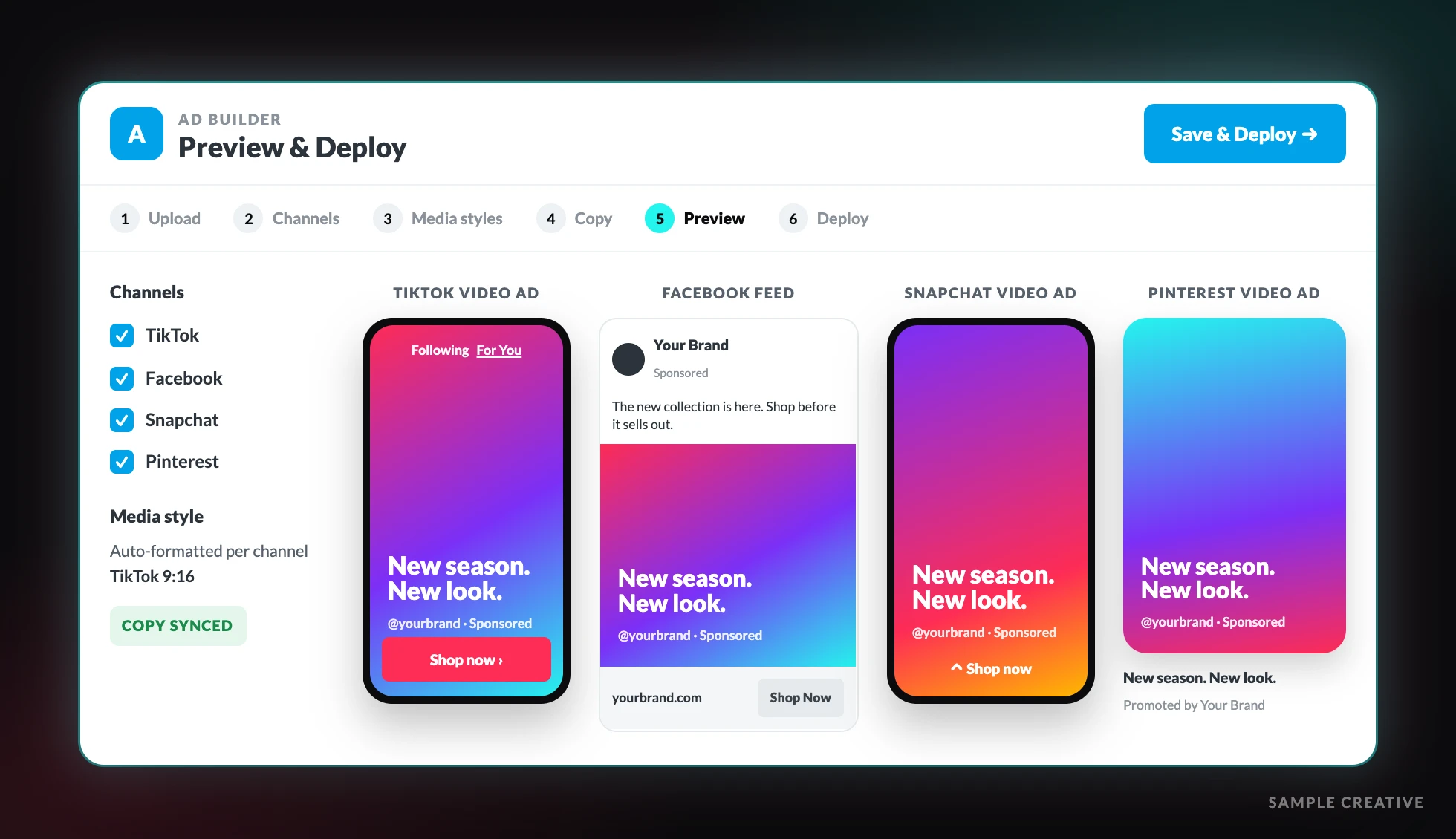
Most teams rebuild the same ad in TikTok Ads Manager, then again for Meta, then again for Snapchat. In the BuyerBridge Ad Builder you upload the creative once, write the copy once, and see it as a TikTok video ad next to Facebook, Snapchat and Pinterest placements.
When it looks right, pick the client account and deploy. Need sign-off first? Send the preview link. It never expires, works without platform access, and shows Spark Ads too.
Auto-Formatted Creative
BuyerBridge resizes and fits creative to TikTok’s vertical specs for you.
Copy for Every Channel
Use the same copy everywhere or tailor it for TikTok.
One Asset Library
Store logos, images and video once and reuse them across every client account.
Campaign Management
Manage TikTok Campaigns Without Opening Ads Manager
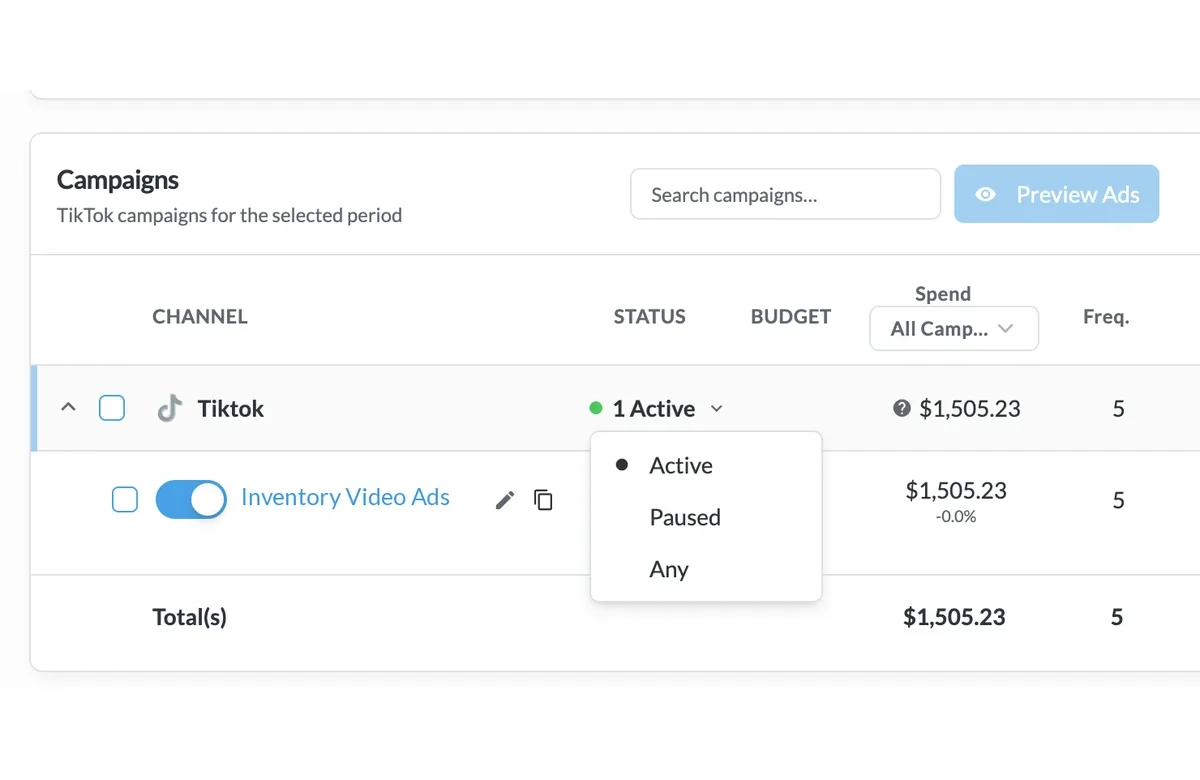
Every TikTok campaign for every client sits in one table with its status, budget, spend and results. Your team can pause a campaign, change a budget or send a preview link from the same screen it uses for Meta, Google, Snapchat, Pinterest and Reddit.
- Turn campaigns on or off and edit daily budgets inline
- Filter by status (Active, Paused or Any), channel and date range
- Move from campaign to ad set to ad without leaving the view
- Send preview links that never expire, so clients approve ads without platform access
Budget Pacing
TikTok Budget Pacing for Every Client Account
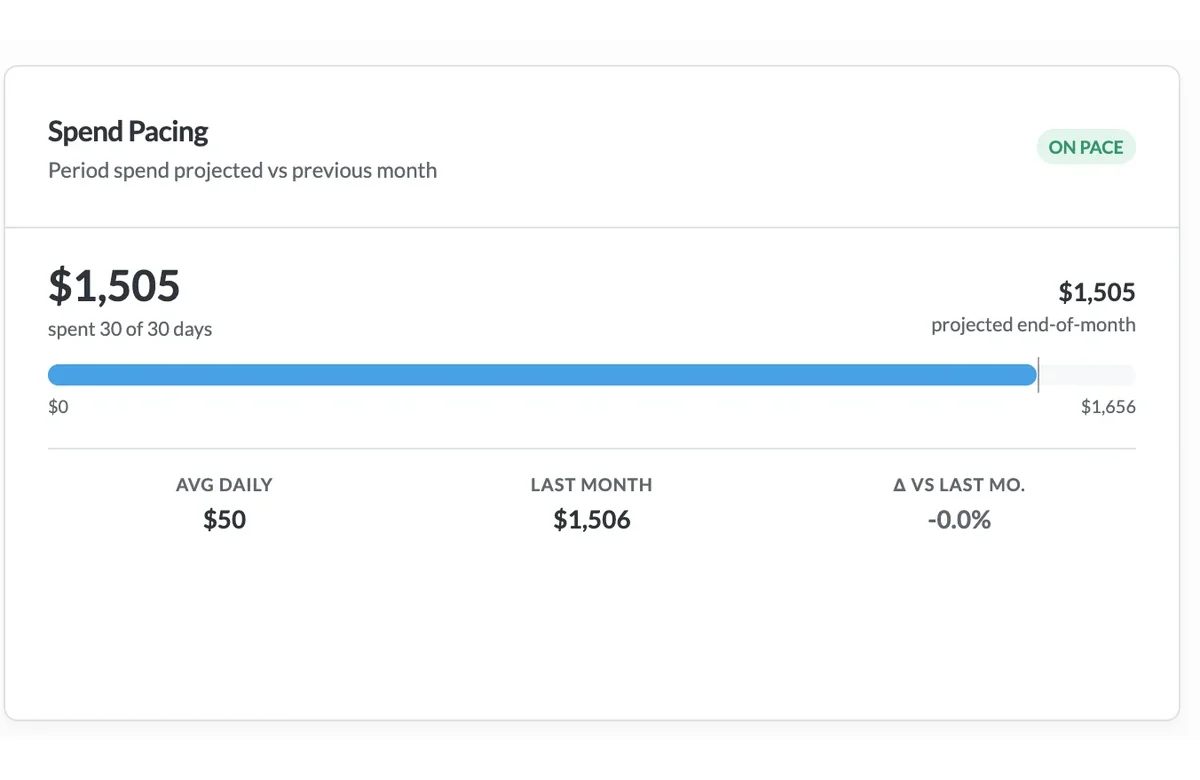
Set a monthly TikTok goal for each client and BuyerBridge tracks the pace for you. The Budgeting Tool puts every account on one page, sorts the ones that need attention to the top and suggests the daily budget that lands the month on target.
- Spend to date, projected month-end spend and average daily spend for each account
- Auto-Pacing adjusts campaign budgets once a day toward the monthly goal
- Daily changes stay within 20%, so TikTok campaigns don't drop back into learning
- A change log shows every budget edit and who made it
Dashboard Data
The TikTok Data Your Team and Clients See
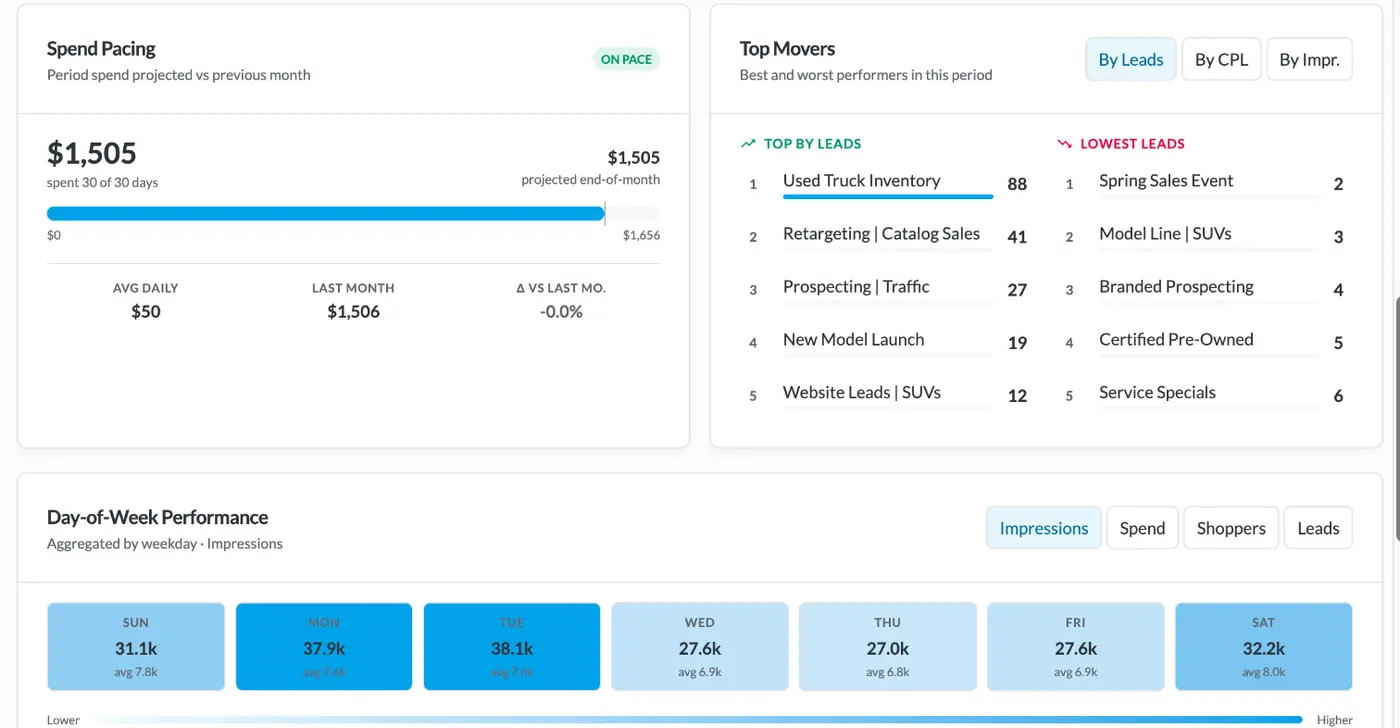
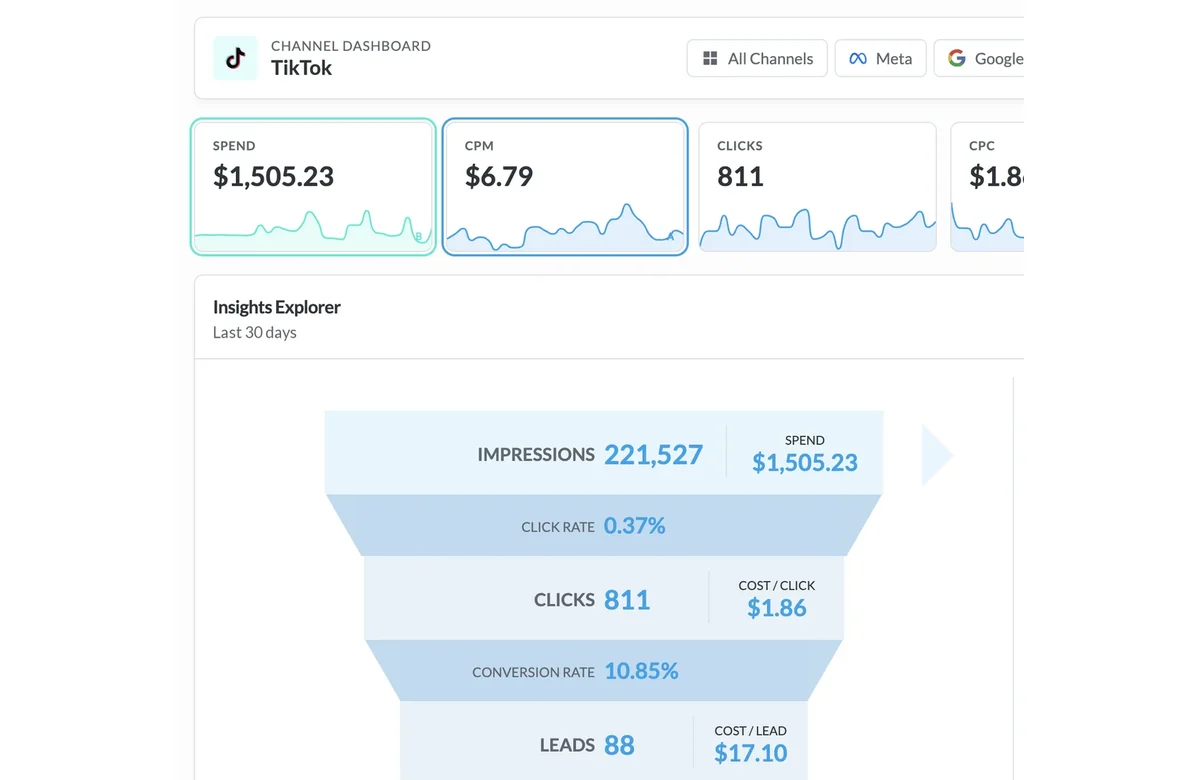
TikTok results land in the same metrics you already report for every other channel. Open the TikTok channel dashboard to follow a client from impression to lead, then chart the trend behind any number.
- Spend, impressions, CPM, clicks, CPC, leads and cost per lead
- Video views, landing page views and sales for each campaign
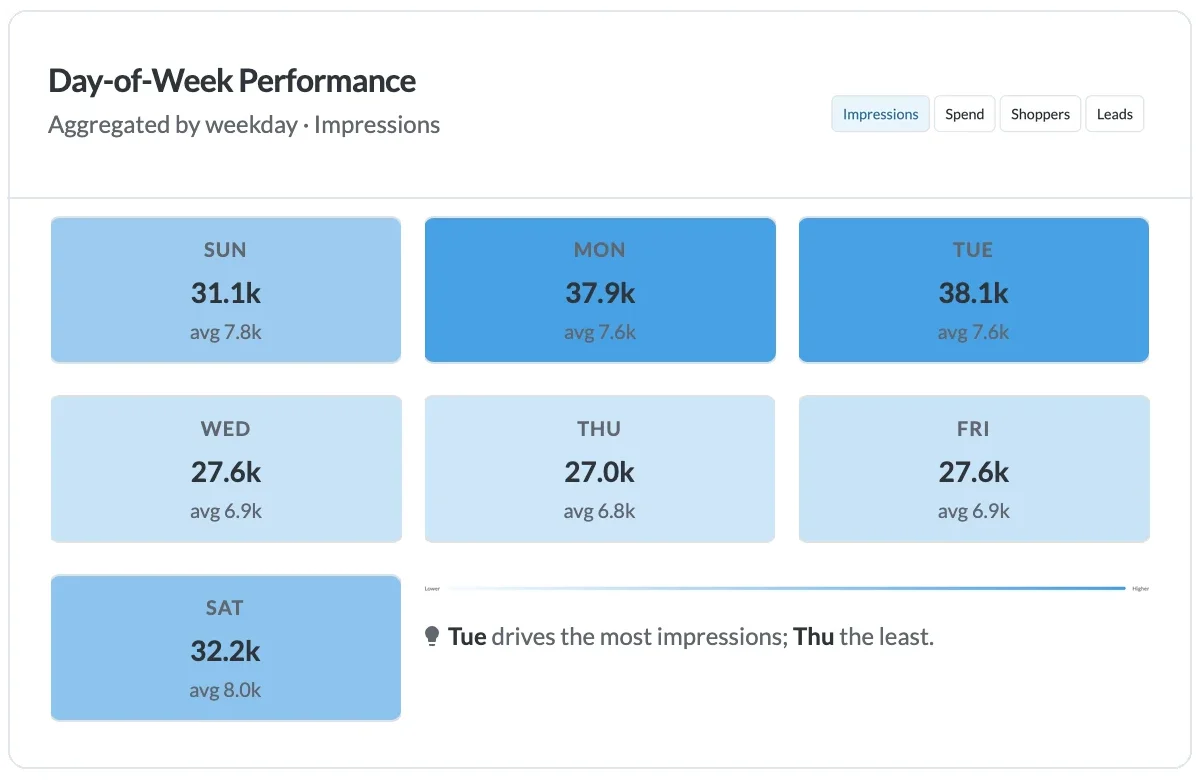
- Day-of-week results for impressions, spend, shoppers and leads
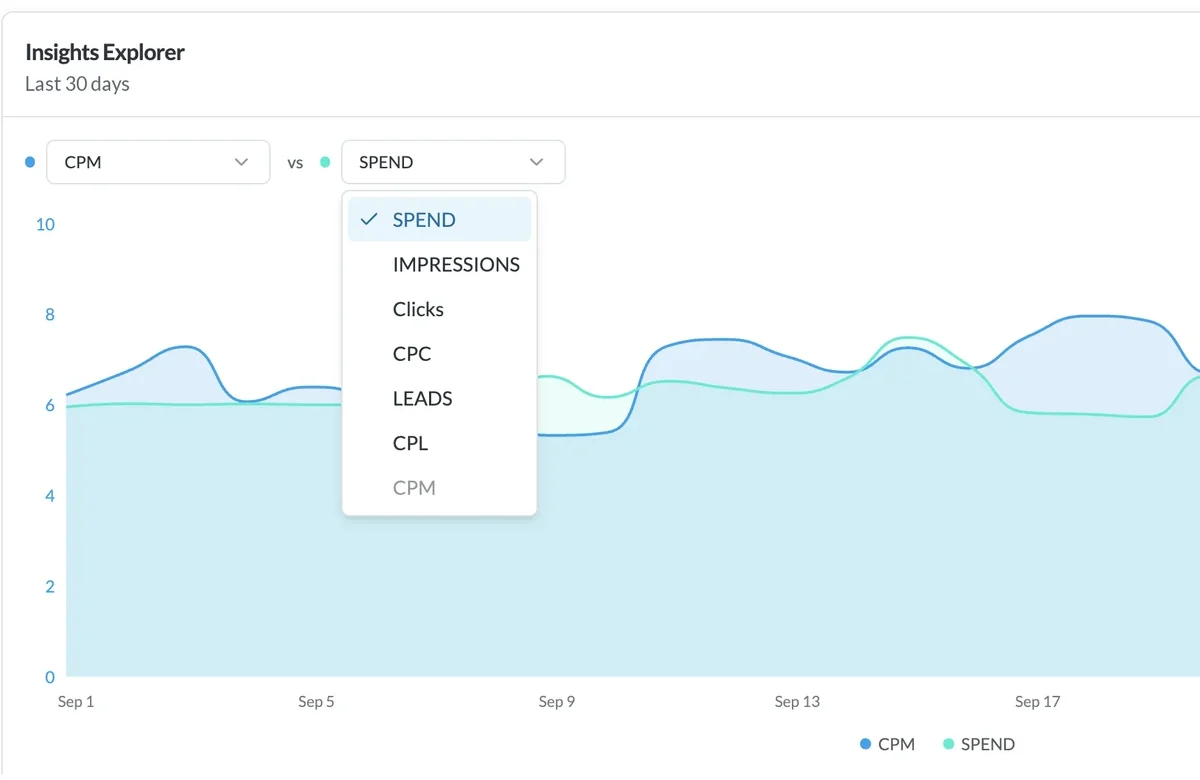
- Insights Explorer to plot any two metrics against each other
- Alerts for pixel errors, budget issues and performance drops, with a support ticket one click away
White-Label TikTok Reports and Insights
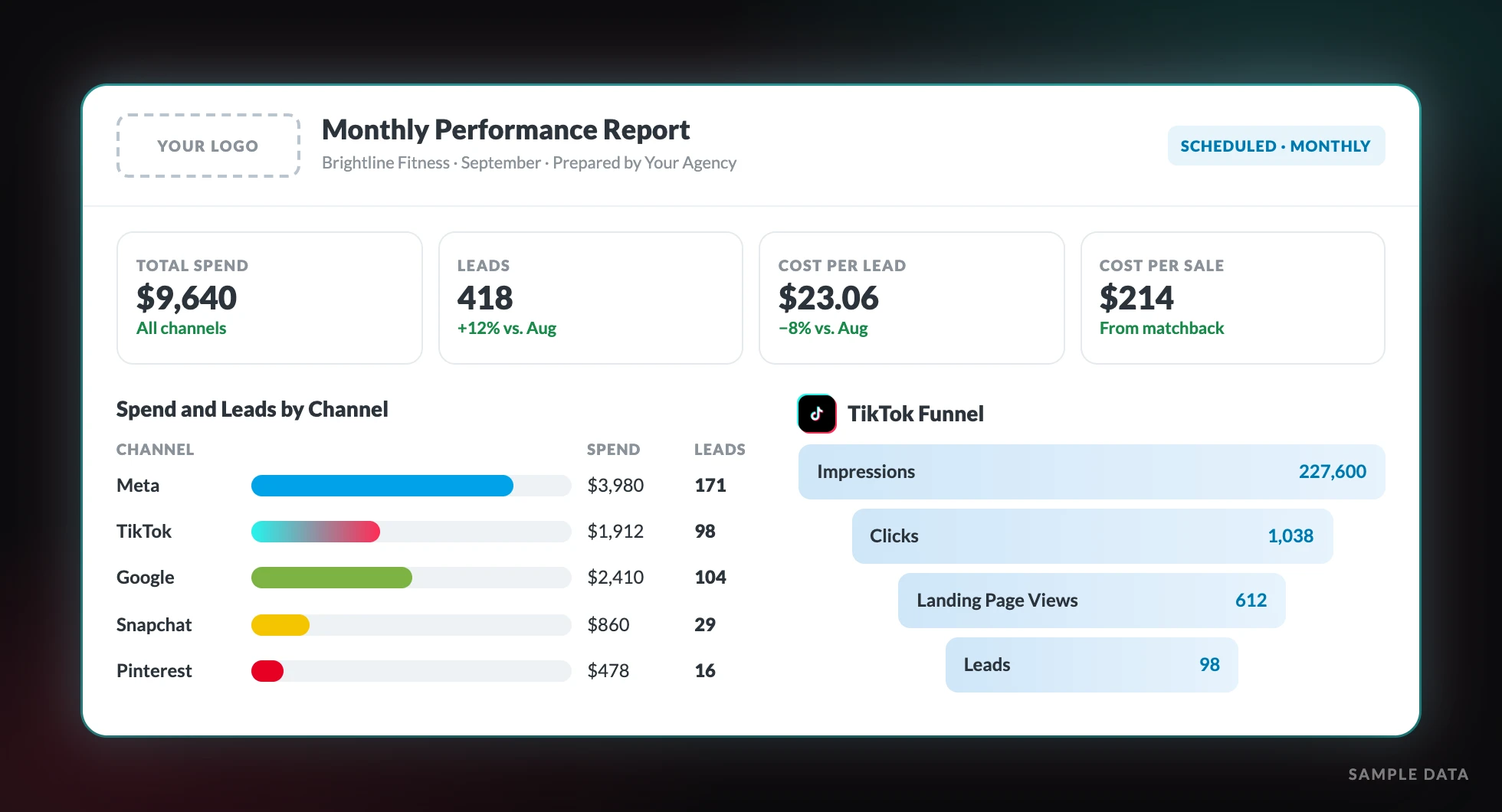
Give every client a branded report that puts TikTok next to every other channel they run. Build it once in Report Builder, then schedule it to send on its own.
Funnel Visualization
Show clients how people move from impression to click to lead on TikTok.
Engagement Analytics
Custom PDF Builder
Build presentation-ready PDF reports with your agency’s logo, colors and notes for client meetings.
Connect TikTok Once, Then Onboard Every Client
Self-Serve TikTok Onboarding
Connect your agency’s TikTok account once, then add client ad accounts on your own schedule.
Unlimited Users
No per-seat fees. Set up user groups so each account manager only sees their own clients.
TikTok Conversion Tracking With EventFlow
What We Track
Page Views
Monitor overall site engagement
High-Intent Page Views
Track visits to the pages that matter most
Form Submissions
Capture lead generation events
Widget Clicks
Capture clicks on chat and contact widgets
Chat Engagements
Track conversation initiations
EventFlow is one piece of code that sends these events to TikTok and your other ad platforms. TikTok learns which people take action, and you get conversion data you can report on.
Running TikTok for Car Dealers?
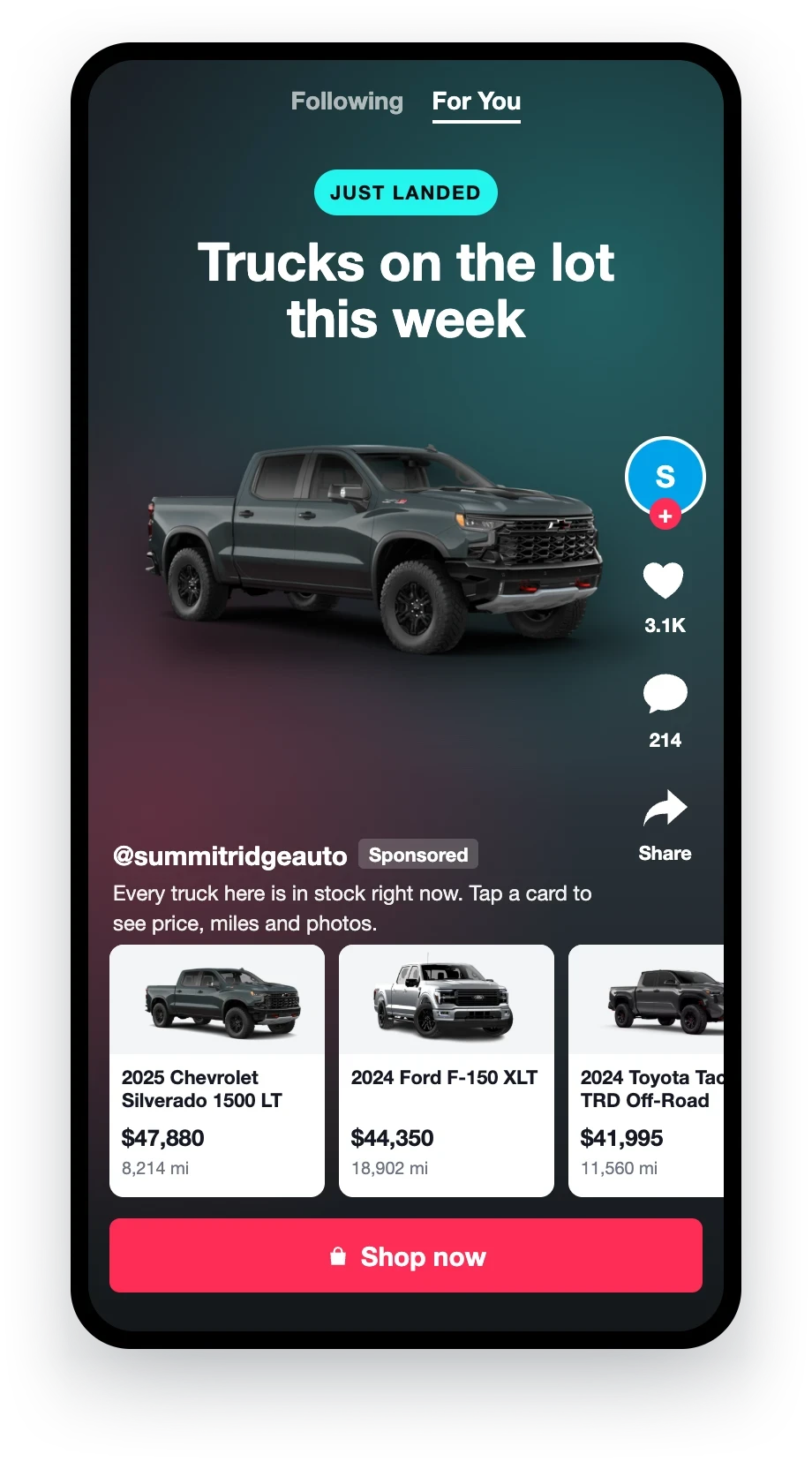
Inventory Ads
Dealers can turn every vehicle in their feed into its own TikTok ad. See how it works on our TikTok automotive ads page.
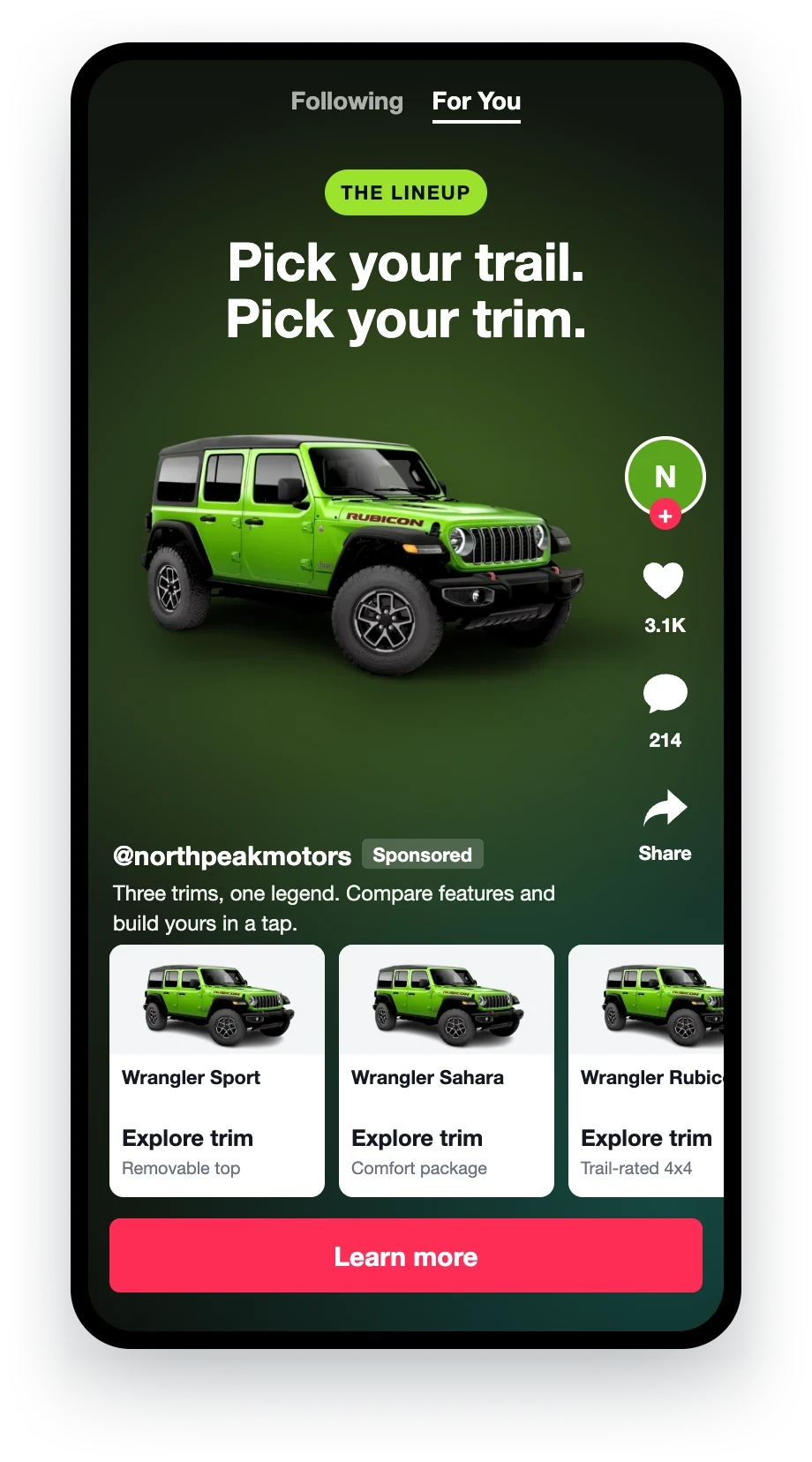
Model Ads
Manufacturers can promote a whole model, trim or offer in TikTok’s video format with shoppable product cards.
Inventory feeds, VIN-level ads and vehicle catalogs for every rooftop. Check out the tools built for dealer TikTok campaigns.
Why You’ll Love BuyerBridge for TikTok Ads Automation
Without BuyerBridge
Tab Switching Kills Speed and Focus
Your team wastes time hunting for simple answers.
Onboarding Slows Everything Down
Onboarding is where momentum dies.
Reporting Eats Time Needed to Scale
You’re stuck summarizing instead of optimizing.
Approvals Turn Launches Into Waiting
Screenshots and email threads slow every rollout.
With BuyerBridge
One Login. Total Clarity.
All your channels, data, and campaigns in one place.
Scale New Accounts With a Cleaner Workflow
Onboard a new client and launch campaigns without starting from scratch.
Reporting Built to Unlock Growth
Real-time dashboards to optimize in less time.
Quicker Approvals, No Bottlenecks
Send clients one preview link and get sign-off without screenshots.
How to Choose the Best TikTok Ads Automation Tools in 2026
Look for Workflow Automation, Not Just Bid Automation
When you compare tools, look at how much work they take off your team beyond bid changes. A tool that only adjusts bids leaves onboarding, reporting and approvals on your plate. The best TikTok ads automation tools in 2026 cut time in those places and show every channel in one view.
Here’s a simple checklist:
Can you scan performance across channels in one place?
Can you report without rebuilding from scratch?
Can clients review ads without confusion?
Does it cut setup mistakes and repeat steps?
TikTok Ads Automation FAQ
Quick answers for agencies adding TikTok for their clients.
What is TikTok ads automation?
TikTok ads automation is software that builds, launches, paces and reports on TikTok ads so your team doesn’t do each step by hand in TikTok Ads Manager. BuyerBridge does this for every client account and puts TikTok next to Meta, Google, Snapchat, Pinterest and Reddit in one dashboard.
Can I manage TikTok campaigns without logging in to TikTok Ads Manager?
Yes. From BuyerBridge you can turn TikTok campaigns on or off, edit daily budgets, filter by status and date range, and send clients preview links that never expire.
How does BuyerBridge pace TikTok budgets?
Set a monthly goal and the Budgeting Tool tracks spend to date, projected month-end spend and a suggested daily budget. Auto-Pacing adjusts campaign budgets once a day, daily changes are capped at 20% so campaigns stay out of the learning phase, and a change log records every edit.
What TikTok data can I report to clients?
Spend, impressions, CPM, clicks, CPC, video views, landing page views, leads and cost per lead, plus results by day of the week. Reports can carry your agency’s branding and show TikTok next to every other channel.
How do I connect TikTok for a new client?
Connect your agency’s TikTok account once, then add each client’s ad account. TikTok onboarding is self-serve, and there’s no charge per user seat.
Does BuyerBridge track TikTok conversions?
Yes. EventFlow sends page views, high-intent page views, form submissions, widget clicks and chat engagements from the client’s website to TikTok and the other connected ad platforms.
Can you run TikTok catalog ads from BuyerBridge?
Yes. BuyerBridge takes the client’s catalog feed and turns it into the video format TikTok catalog ads require, then deploys through the same wizard as every other channel. Playbooks also support TikTok Smart+ campaigns. Dealers can see the automotive version on the TikTok inventory ads page.
Real Results. Real BuyerBridge Feedback.
Trusted by growth-focused teams managing everything from boutique brands to national automotive dealership groups.