
Google Ads Automation Tools Built for Automotive
Launch and Manage Search and Performance Max
Watch our 60-second trailer now
Every Google campaign type a dealer needs, built from your client’s live inventory and managed beside your paid social. Our Performance Max Playbook turns inventory feeds into Vehicle Listing Ads in 15 minutes. Our Search Playbooks stay keyword-driven, so you stay in control of the queries.
Watch our 60-second trailer now
What Are Google Ads Automation Tools?
Google Ads automation tools handle the manual work of building, managing, and reporting on campaigns so your team does not do it by hand. For an automotive team, that means launching Search and Performance Max campaigns, with Performance Max generating the Vehicle Listing Ads from your feed, keeping every campaign synced to the vehicles on your lot, and pulling reports across every store from one place.
What BuyerBridge Automates for Google Ads
Campaign Building
Launch Search and Performance Max from Playbooks instead of building each one by hand.
Inventory Sync
Keep every campaign matched to what is on the lot, refreshed from your feed daily.
Keyword Research
Pull keyword ideas from real search data, with match types and negatives set.
Performance Reporting
See every store in one dashboard and export client-ready reports in minutes.
What a Good Google Ads Automation Tool Does for an Automotive Team
THE PROBLEM
How Much Time Are You Losing Each Month?
You are not short on Google strategy. You are short on hours. Most of the week goes to rebuilding the same campaigns store by store, catching spend before it drifts off plan, and pulling numbers that never tie back to a car that sold.

The Same Build, Every Store
Every rooftop starts from the same blank campaign. Multiply that by your client roster and the week disappears into rebuilds.

Google Decides the Spend
Left alone, Performance Max optimizes for what it wants, including client’s brand name, paying premium for traffic they already had.

Clicks, Not Cars Sold
Google reporting stops at impressions, clicks, and cost. It never shows whether a vehicle sold.
BuyerBridge By The Numbers
Google Ads Automation on BuyerBridge, Scale Your AdOps
How Do You Launch a Dealership's Google Campaigns in Minutes?
Does Google Ads Management Software Manage Campaigns, or Does It Only Launch Them?
Both. And the management half is where most automation tools stop.
Launching is the visible part. What decides whether a Google account performs is the eight weeks after launch: which search terms waste money, which keywords deserve their own ad group, whether the ads are still eligible, and whether the budget is buying the traffic you wanted. BuyerBridge is the Google Ads management software agencies use to run that work across every account, not just the launch.
Keywords, with match types you control
Run all three match types where the account is actively managed. Hands-off accounts default to phrase and exact, because broad match left alone spends the month on parts, service, and recall queries. Ad groups stay tight and single-theme.
Negative keywords at two levels
Campaign-level negatives block the universal waste: free, jobs, recall, salvage. Ad-group negatives route a model search into the ad group built for that model instead of letting it land somewhere generic.
Responsive search ads, fully built
One responsive search ad per ad group with every field populated, up to 15 headlines and 4 descriptions, tokenized to the dealer, the city, and the models they stock.
Impression share and pacing in one view
Performance Max impression share sits next to spend, so a campaign losing share to budget is visible before the month closes, not after.
Manage Your Google Ad Accounts Faster
How Long Does It Take to Onboard a New Google Ad Account with Automation?
Adding a dealership’s Google account by hands means chasing account logins, Merchant Center access, syncing vehicle feeds, GA4 connection, and more. Now multiple that by every location you manage.
With BuyerBridge, that setup is a guided, reusable workflow so you can get new accounts up and live in days, not weeks.
The Manual Way
- Get access to the Google Ads account
- Set up and verify Google Merchant Center
- Build and submit the vehicle feed
- Link GA4 and build conversion tracking
- Set account-level conversion goals
- Repeat for every rooftop
Guided, Done for You
- Ad account and Merchant Center connected
- Vehicle feed configured and syncing daily
- GA4 linked, tracking set via EventFlow
- Account-level conversion goals set
- Authenticated once per organization
- Up to four hours of support
How Do Agencies Run Google Ads for Multiple Dealerships?
Managing Google Ads across a roster of dealerships means watching spend, pausing and adjusting campaigns, and approving ads for every account, without logging into Google one client at a time.
BuyerBridge is the PPC management software agencies use to do that from one view. Every Google campaign sits in the same dashboard as the paid social channels you already run, so switching to Google changes what you are looking at, not where you go to look.
One View, All Accounts
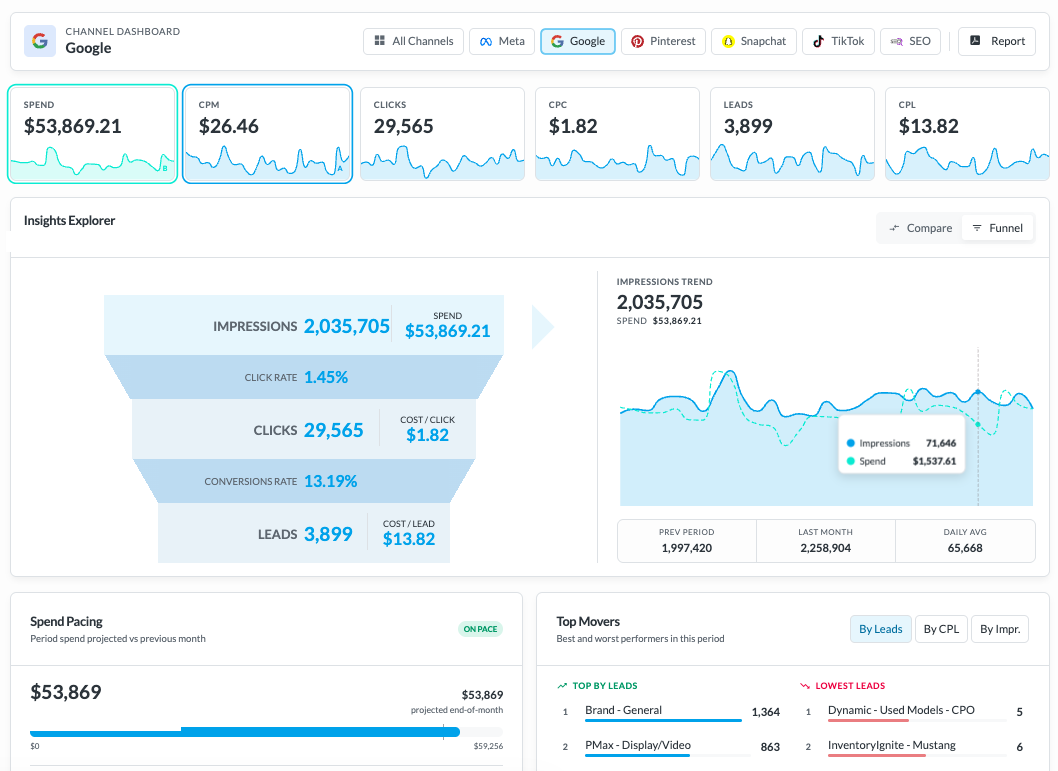
Monitor Google campaigns across all your accounts. Filter by campaign, ad group, ad, status, and date range.
Makes Changes Live
Pause campaigns, edit daily budgets, and preview the exact ads running, all without opening Google Ads.
Fast Client Approvals
Send a shareable ad preview link for approval. No Google Ads access, no screenshots passed back and forth.
PPC + Social Ads in One
Google runs in the same platform as Meta, TikTok, Reddit, Snapchat, and Pinterest in one dashboard.
What Can You Launch with Google Playbooks?
A Google Playbook is a pre-built campaign for automotive, set to optimize for account-level conversions: calls, form leads, store visits, and contacts. Pick one and it deploys across every rooftop from your live inventory feed. Performance Max campaigns build Vehicle Listing Ads from the feed and serve across the full Google network, Search, Shopping, YouTube, Display, Gmail, Discover, and Maps, while Search Playbooks covers every layer of intent: your store's brand, the OEM makes and models you sell, service and parts, and non-branded shoppers still deciding.
How Do You Show Clients Their Google Ads Results?
- Every VIN with spend, clicks, CTR, and days advertised
- Influenced Sales and cost per influenced sale, computed for Google
- A status on every vehicle: still for sale, or sold
- Hover a vehicle to split its spend by platform, export to CSV
Report Builder
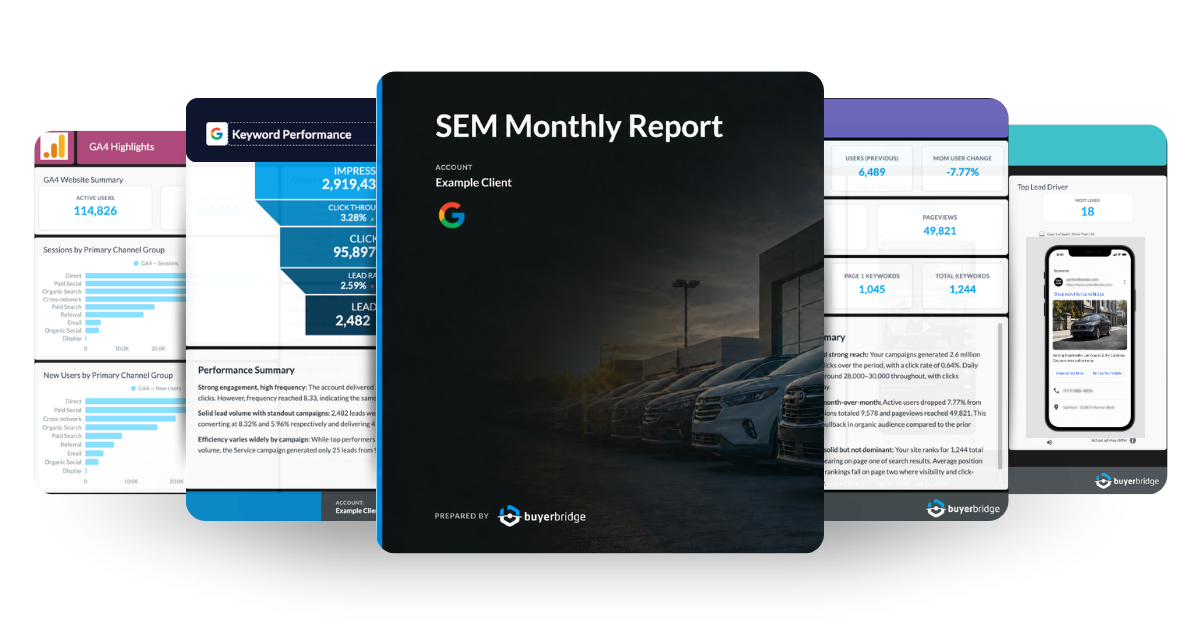
Drag-and-drop charts, funnels, and ad previews. White-labeled in your branding and scheduled to send on its own.
Dashboard KPIs
The funnel from impressions to cost per lead, with period comparisons across every account or one.
Alerts
Watches Google Ads, GA4, and Merchant Center and flags tracking, budget, and feed issues, with a support ticket one click away.
How To Keep Google Ad Spend on Pace for Multiple Accounts?
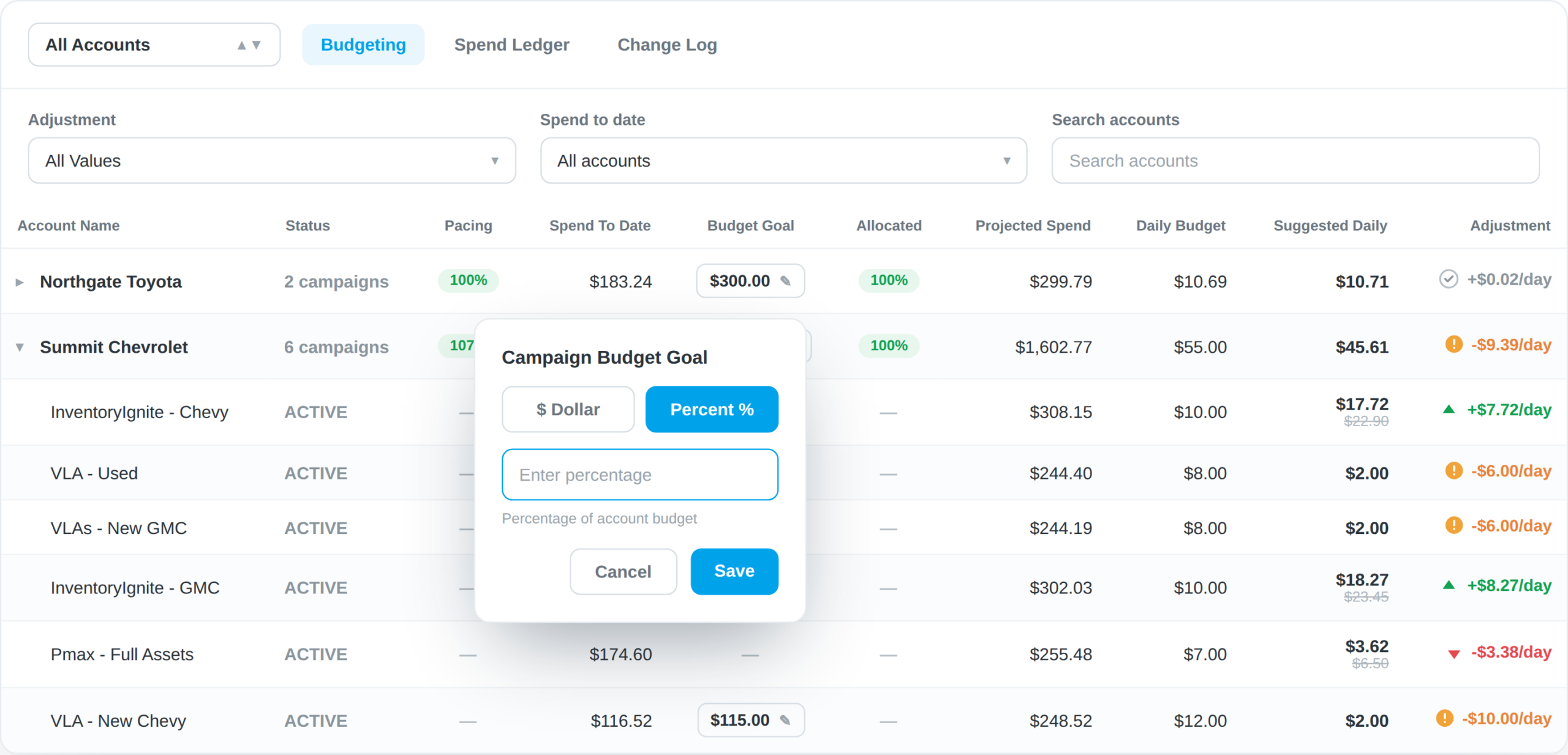
See pacing, set budget goals, and monitor projected spend for all your Google accounts in one view.
When an account drifts off its monthly goal, BuyerBridge surfaces a suggested daily adjustment you can apply to bring it back on track
Monthly pacing and budget goal for every account and campaign
Projected spend with a suggested daily adjustment
Make changes per campaign or across the account
Off-pace and overspending accounts flagged for correction
What Does Google Ads Automation Look Like in BuyerBridge?
A four-minute walkthrough, from the inventory feed to a live campaign to the report you hand the client.
- Every channel in one dashboard, with Google in the same view
- A product set built from your live feed, filtered by ad performance
- A full Google Playbook deployed in a few guided steps
- Budget, landing page, and geo set once, inherited by every campaign
- Reporting in the new builder, down to spend per vehicle
Frequently Asked Questions About Google Ads Automation
Q: Do I need Google Ads automation software, or can I just use Google Ads?
A: Google Ads has built-in automation for bidding, but not for the work around the campaign: building Search, PMax, and Vehicle Listing Ads for every store, keeping them matched to inventory, and reporting across accounts. Automation software handles that layer.
BuyerBridge is the automotive version, so an agency can launch and manage Google campaigns across every rooftop from one place instead of rebuilding each one by hand.
Q: What KPIs should be in a Google Adwords report for most clients?
A: A useful Google Ads report shows the full funnel, not just clicks: impressions, click-through rate, clicks, conversion rate, leads, and cost per lead, with the current period compared to the last. For a dealership, it should also tie spend to inventory, showing spend per vehicle and which cars the ads influenced. BuyerBridge reports all of this from the same data that runs the campaigns, white-labeled for the client.
Q: What’s the difference between Google Ads automation and “auto-bidding”?
A: Bid automation is what Google already does inside the platform, adjusting bids toward a goal like Maximize Conversions. It does not build your campaigns or keep them matched to inventory. Google Ads automation software handles that workflow: building Search, PMax, and Vehicle Listing Ads, syncing them to the feed, pacing budgets, and reporting. The real time savings come from automating the workflow, not the bids.
Q: How do you manage multiple Google Ads accounts in one place?
A: Managing Google Ads for many dealerships means watching spend, pausing and adjusting campaigns, and approving ads without logging into each account one at a time. BuyerBridge puts every Google campaign in one dashboard, with budget, status, and performance in view, next to the paid social channels you already run. You can pause a campaign, edit a daily budget, and share a preview link for client approval from that one screen.
Q: How fast can you launch Google Ads for a new dealership?
A: Launching Google Ads for a dealership means connecting the ad account, Google Business Profile, Google Analytics, conversion tracking, and the inventory feed before the first campaign runs. Done by hand, that is days of setup per store. On BuyerBridge the setup is guided and reused across rooftops, so most partners have a new account live in about a week, then deploy a full campaign from a pre-built Playbook.
Q: How do I reduce Google Ads setup errors when onboarding new clients?
A: Most Google Ads setup errors come from missed steps like a disconnected conversion tag, a feed that fails to sync, or a Merchant Center disapproval no one caught. BuyerBridge onboards a new account through a guided checklist, connecting the ad account, Google Analytics, conversion events, and the inventory feed, then flags issues across Google Ads, GA4, and Merchant Center so they are fixed before they cost impressions.
Q: How do you prove Google Ads influenced car sales?
A: Clicks and impressions do not tell a dealer which cars sold. BuyerBridge connects Google spend and clicks to the vehicles that left the lot with a metric called Influenced Sales: when a VIN that had spend and engagement drops out of the inventory feed, it counts as an influenced sale. The Vehicle Advertising Report shows this VIN by VIN, with cost per influenced sale, so you report cars, not just clicks.
Real Results. Real BuyerBridge Feedback.
Trusted by growth-focused teams managing everything from boutique brands to national automotive dealership groups.