
AI Visibility Tracking Software That Gets Your Dealers Recommended
BuyerBridge AI visibility tracking software shows which dealers ChatGPT, Claude, Gemini, Perplexity and Google AI Overviews recommend, for every rooftop your agency manages.
Shoppers ask AI where to buy before they ever see an ad. If the answer names the store down the road, your client never hears about it. Now you’ll know, and you’ll know which page fixes it.

See AI Visibility Tracking in 60 Seconds
A quick walk through the Overview, Prompts, Competitors and Roadmap views inside BuyerBridge.
What Is AI Visibility Tracking Software?
AI visibility tracking software runs the questions car shoppers ask AI assistants every day, then records whether your client is named, where it lands, which sources the answer leans on, and who gets named instead. It tracks mentions. Clicks still come from your ads and the dealer’s site.
Visibility Score
The share of AI answers that name your client at all.
Average Position
Where your client lands when it is named. First is the answer shoppers act on.
Citation Share
How often AI cites your client's own site, not a marketplace listing.
Share of Voice
Your client's mentions against the competitor rooftops you track, plus the whole market.
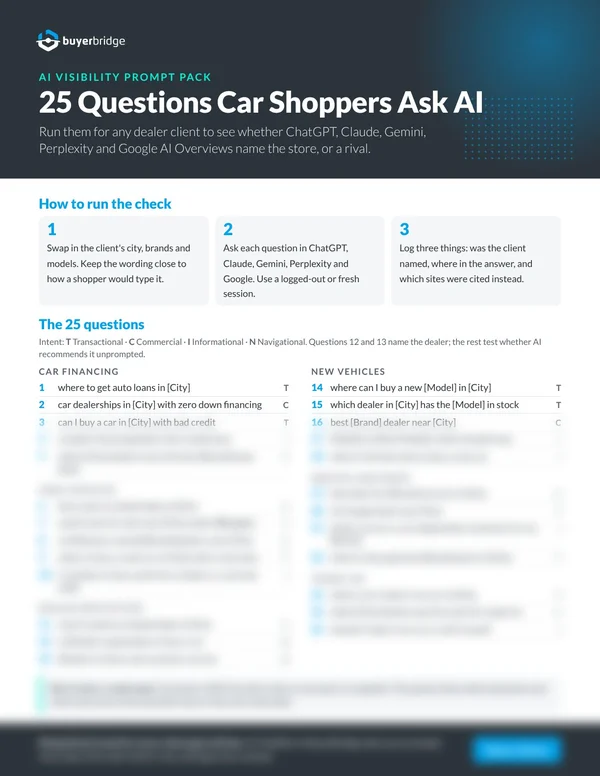
25 Questions Car Shoppers Ask AI
Run them for any dealer client and see who AI names. Includes a 14-crawler checklist to confirm AI can read the site at all.
- 25 local questions by topic and intent
- A 3-step way to log what each assistant says
- Site checks and sample robots.txt lines

Which AI Assistants Does BuyerBridge Track?
ChatGPT, Claude, Gemini, Perplexity and Google AI Overviews. Each gets its own score, split into branded and unbranded prompts.
Google AI Overviews Tracking
Google AI Overviews get their own score, separate from the chat assistants. They sit at the top of the results page, where Google's AI features and regular search meet. Open any prompt to read the overview Google wrote and the sites it cited.
- Branded prompts show whether AI gets your client right when asked by name
- Unbranded prompts show whether AI recommends your client when nobody named it
- Asked every day from the client's own city, so you see the local answer
- Sentiment on every answer that names the client, with the themes AI repeats about it

How Does AI Visibility Tracking Work?
Pick the Competitor Rooftops
Search by name, city or state, filter by 10, 25 or 50 miles, and add the alternate spellings AI uses for each store.
Ask From the Client's City
Prompts are built from the client's site and search data, then asked every day as a local shopper would ask them, tagged by topic and intent.
Find the Gaps
See the prompts where rivals win, the prompts with no page on the client's site, and the crawlers its robots.txt leaves out.
Brief the Page, Track the Result
Copy a page brief into your AI assistant, publish the page, then track whether assistants start citing it.
Who Does AI Recommend Instead of Your Client?
The conversation shifts from "AI search" to "the Ford store 15 miles away owns the lifted-truck questions."
- Share of voice against your tracked set and against the whole market, ranked
- Visibility by topic for every rooftop, so you see which line of business a rival owns
- Each competitor's distance, advertised inventory and average price next to your client's
- Brand-name aliases, so a misspelled mention still counts


Which Questions Is Your Client Losing?
Every tracked prompt gets its own row, worst first, with a verdict on whether a page of the client's site actually answers it.
- A page check on every prompt: is the client's best page for it actually getting cited?
- Where Rivals Win: the prompts a competitor gets named for and your client doesn't
- Read every AI answer word for word, including the ones that named someone else
- Filter by topic and intent, then export the list
Which Pages Should Your Client Build Next?
The Roadmap turns the gaps into a ranked list of pages to create, fix or refresh, with the evidence behind each one.
- Ranked by the gap, the search demand behind it and the stock the page would sell
- A content plan built from the searches the assistants run before they answer
- Your cited pages and cited sources, so you see where AI grounds its facts
- A copy-ready brief for each page, written for ChatGPT, Claude or Gemini to draft from
- Approve the pages you’ll build, then build them with the BuyerBridge MCP server and the assistant you already use
- Track a published page to see whether assistants start citing it


Can AI Even Read Your Client's Site?
If an AI crawler can't reach the site, no amount of content work gets it cited. The Overview checks that first.
- 14 AI crawlers checked against the site's robots.txt: named, allowed or blocked
- HTTPS, TLS and llms.txt checks on the client's own domain
- Re-audited, so a site change that blocks a crawler shows up
BuyerBridge vs a Standalone AI Tracker: What Changes?
| What you need | Standalone AI tracker | BuyerBridge |
|---|---|---|
| Paid media data | Separate login | Same platform as your ad channels |
| Competitors | Brand domains | Dealer rooftops with distance, inventory and price |
| Prompts | General brand questions | Local car-shopping questions by topic and intent |
| Content gaps | A score to interpret | Prompt-by-prompt verdict on the client's own pages |
| Many clients | Workspace per client | Every dealer account you already manage |
AI Visibility Tracking FAQ
What is AI visibility tracking?
It records how often AI assistants name a business when people ask questions it should answer, and who they name instead.
Is this an AI intelligence report?
Yes, and it keeps running. AI Visibility asks the same questions every day and stores every answer, so your client reporting can show how their place in AI answers moves month to month. Some agencies call this an AI visibility tool or GEO tracking.
Can I read what the AI actually said?
Yes. Every answer is stored word for word, tagged with whether it named your client, cited its site, and where it ranked it.
What if AI spells a dealer's name differently?
Add the alternate spelling as an alias. Every spelling we can match is a mention we count, from the next sweep forward.
Does a mention in AI count as a lead?
No. AI Visibility shows whether a dealer is surfaced accurately and how it compares to competitors. Leads still come from your paid and organic channels.
What is an AI visibility audit?
A one-time check of where AI assistants name a business, where they don’t, and which sites they cite instead. AI visibility tracking software runs that audit every day, so you see a trend instead of a snapshot. The free Prompt Pack on this page walks you through a manual version.
Is there AI search visibility tracking for agencies?
Yes. AI Visibility is built for agencies that manage many dealers. Each rooftop gets its own prompts, competitors and score, inside the same BuyerBridge login your team already uses.
Can my agency write its own prompts?
Yes. AI Visibility writes a starting set from the client’s site and search data. You can check the ones to track, edit any prompt, and ask for more suggestions.
Does location change the answers?
Yes. AI Visibility asks each prompt as a shopper in your client’s city, so the answers match what local shoppers see.
Why don’t my numbers match another AI tracking tool?
Each tool asks different prompts, checks a different set of assistants and counts mentions its own way, so the numbers won’t line up exactly. Compare trends inside one tool, not scores across tools.
Can my dealer clients see it?
Yes, if you want them to. Your agency picks which paid pages each client login can see, so you can turn AI Visibility on for a client’s store or keep it in house.
Can I show it to a dealer I’m pitching?
Yes. Add a demo dealer with sample data under Sales Tools and walk the prospect through AI Visibility before they sign. Sales Tools also has AI Visibility Sheets, a ready-made one-pager you can send after the call.
Who builds the recommended pages?
You do, with help. Each recommended page comes with a brief to paste into the AI assistant you already use. Or approve the page and have an assistant build it with the BuyerBridge MCP server. Either way, you review and publish.
See Where Your Clients Show Up in AI Answers
Book a 30-minute demo and we'll run AI Visibility on a dealer like yours, live.