
Budget Pacing Software That Ends Overspending
Set a monthly goal for every client account. Auto-pacing fixes the daily budget across 6 ad channels.
Ad platforms are built to spend flexibly. Google lets a campaign spend up to 2 times its average daily budget on a single day. When a client asks why they spent $9,400 against an $8,000 budget, that's a conversation you lose. BuyerBridge checks spend against the plan every day and moves the daily budget to close the gap.

What Is Budget Pacing Software?
Budget pacing software tracks ad spend against a monthly goal and changes the daily budget so the month lands on target. For an agency, that means every client account on Meta, Google, TikTok, Snapchat, Pinterest and Reddit, checked from 1 page instead of 6 ad managers.
Most pacing tools sell overspend protection. The bigger leak is usually underspend. Nothing breaks when an account underdelivers, and no client calls to complain about a small invoice.
Projected spend flags an account that will miss its goal while there's still time to fix it.
Spend to date shows where the month has been. Projected spend shows where it ends.
Every account and channel in 1 table, with the ones that need you listed first.
Push every pending daily budget change at once, or edit each one first.
See Budget Pacing in BuyerBridge in 60 Seconds
A quick tour of goals, suggested daily budgets and auto-pacing.
How Do You Calculate Budget Pacing?
The budget pacing formula takes what's left of the goal and spreads it over the days left in the month.
(Monthly goal - spend to date) / days left = suggested daily budget
Day 12, with $1,782.40 spent on a $4,500 goal: ($4,500 - $1,782.40) / 18 days = $150.98 a day. BuyerBridge runs that math for every account and campaign, with spend read live from the ad account.
- Budget goal: set in dollars, or as a percent of the account budget
- Daily budget: what the platform is set to today
- Suggested daily: what today should be to land on the goal
- Adjustment: the gap between the 2, in dollars per day

How Does Auto-Pacing Work?
Turn it on for a campaign, and BuyerBridge moves that campaign's daily budget toward the goal once a day.
Why Does BuyerBridge Cap Budget Changes at 20% a Day?
A big budget swing can push a campaign back into the platform's learning phase, and results dip while it relearns. So every daily change is capped at 20%, up or down. The full target still shows next to the capped number, so you can see how far the account has to go.
- Capped suggestions carry a "20% cap" tag
- Changes under $1 a day or 3% are left out of bulk applies
- Edit any new daily budget before you apply it
- Spread a change across campaigns evenly or by share
Fake account, illustrative numbers
How Much Time Does Manual Budget Pacing Cost You?
Pacing 1 account is simple math. Doing it for every account on every channel is where the hours go. Put in your own numbers.
Your pacing workload
The starting numbers are examples. Change any of them to match your team.
That's about 0 workdays back each month.
Which Ad Channels Can You Pace in BuyerBridge?
All 6 sit on 1 Budgeting page. Switch channels with the buttons at the top.
Meta
Facebook and Instagram campaigns. Facebook ads have their own page.
Google Ads campaigns paced next to social. See Google Ads tools.
TikTok
TikTok campaigns with the same goals and suggestions. TikTok ads.
Snapchat
Snapchat campaigns on the same page as every other channel. Snapchat ads.
Pinterest campaigns, paced toward the same monthly goal. Pinterest ads.
Reddit campaigns get goals, pacing and suggestions too.
How Do You Show a Client Where Their Budget Went?
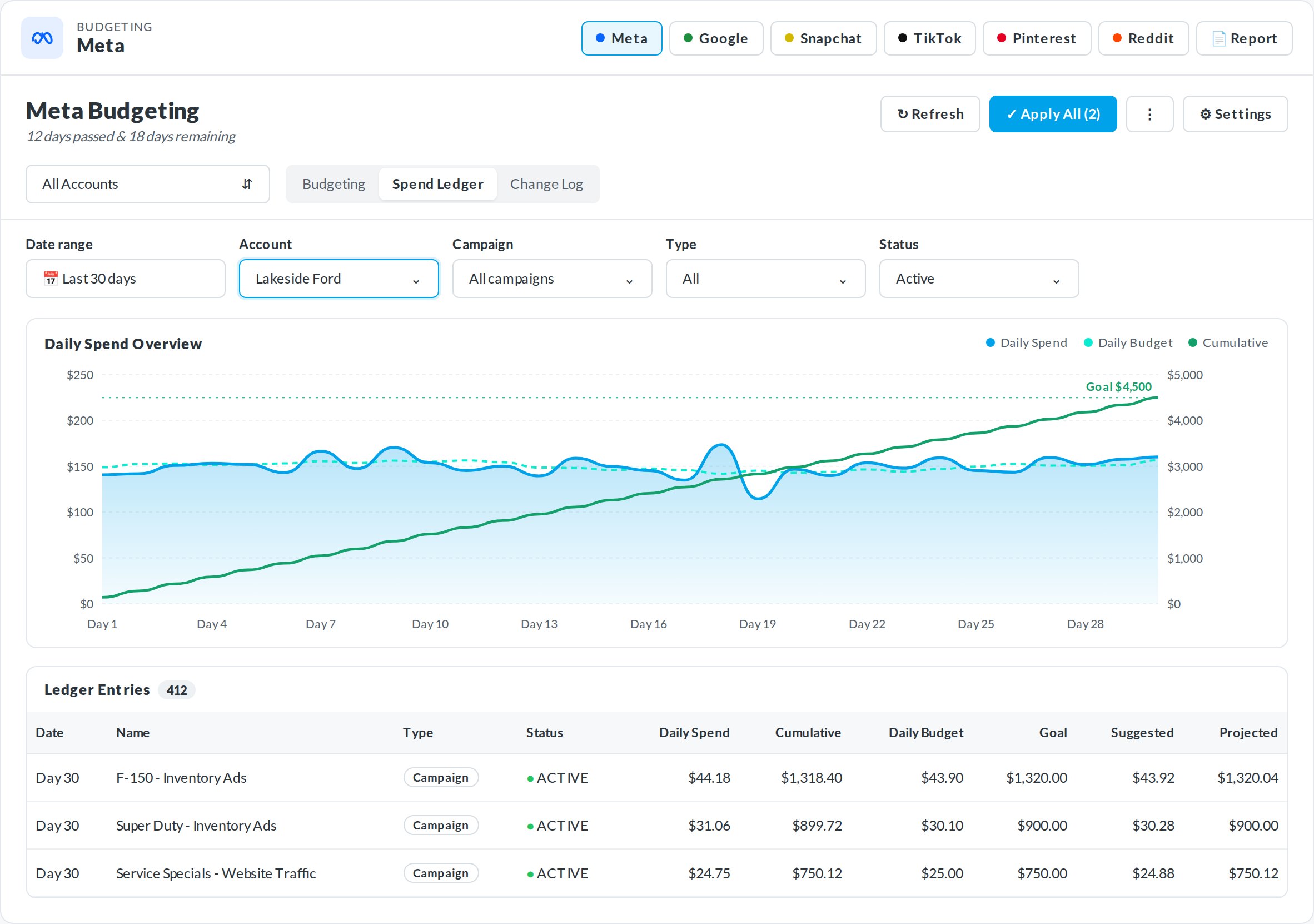
The Spend Ledger charts daily spend, daily budget and cumulative spend against the goal for any account. The Change Log lists every budget change and who made it, including the automatic ones.
- Daily spend history for any date range
- Every change with a name and a time
- 1 filter bar shared by all 3 tabs
Budget Pacing Software vs a Spreadsheet: What Changes?
A spreadsheet does the math. It can't see the ad account, and it can't change the budget for you.
Budget Pacing Software FAQ
What is budget pacing?
Budget pacing is keeping ad spend on track to hit a monthly budget goal, without running out early or leaving money unspent at the end of the month. It means checking spend to date against the goal and changing the daily budget when an account drifts.
What is the budget pacing formula?
Take the monthly goal, subtract spend to date, and divide by the days left in the month. The result is the daily budget you need today. With $1,782.40 spent on a $4,500 goal and 18 days left, that’s $150.98 a day.
What does budget pacing software do?
It reads spend from each ad account, compares it to the monthly goal and suggests a new daily budget for every account and campaign. In BuyerBridge, auto-pacing can apply that change for you once a day.
How does auto-pacing work in BuyerBridge?
Set a budget goal on each campaign and turn on auto-pacing. Once a day, BuyerBridge moves the campaign’s daily budget toward the number that lands the month on goal. An account-level goal alone shows you pacing but doesn’t turn on auto-pacing.
Why are daily budget changes capped at 20%?
Big budget swings can push a campaign back into the platform’s learning phase, which hurts results while it relearns. BuyerBridge caps each daily change at 20% up or down and still shows the full target, so the account reaches it over a few days.
Which ad channels can BuyerBridge pace?
Meta, Google, TikTok, Snapchat, Pinterest and Reddit. All 6 are on 1 Budgeting page, with a button for each channel at the top.
Can I see who changed a budget?
Yes. The Change Log lists every budget change, who made it and when. Changes made by auto-pacing show up as BuyerBridge System.
Does budget pacing stop a platform from overspending?
Not on a single day. Google, for one, can spend up to 2 times a campaign’s average daily budget on a given day. Pacing corrects the daily budget the next day so the month still lands on goal.
Is the Budgeting tool included in every BuyerBridge plan?
Yes. Budgeting and auto-pacing come with every BuyerBridge partner tier.
Keep Every Client Budget on Pace
Book a 30-minute demo and we'll pace an account like yours, live.