
Campaign Management Software for Every Paid Channel
Launch, monitor and adjust campaigns on Google, Meta, TikTok, Snapchat and Pinterest from one dashboard.
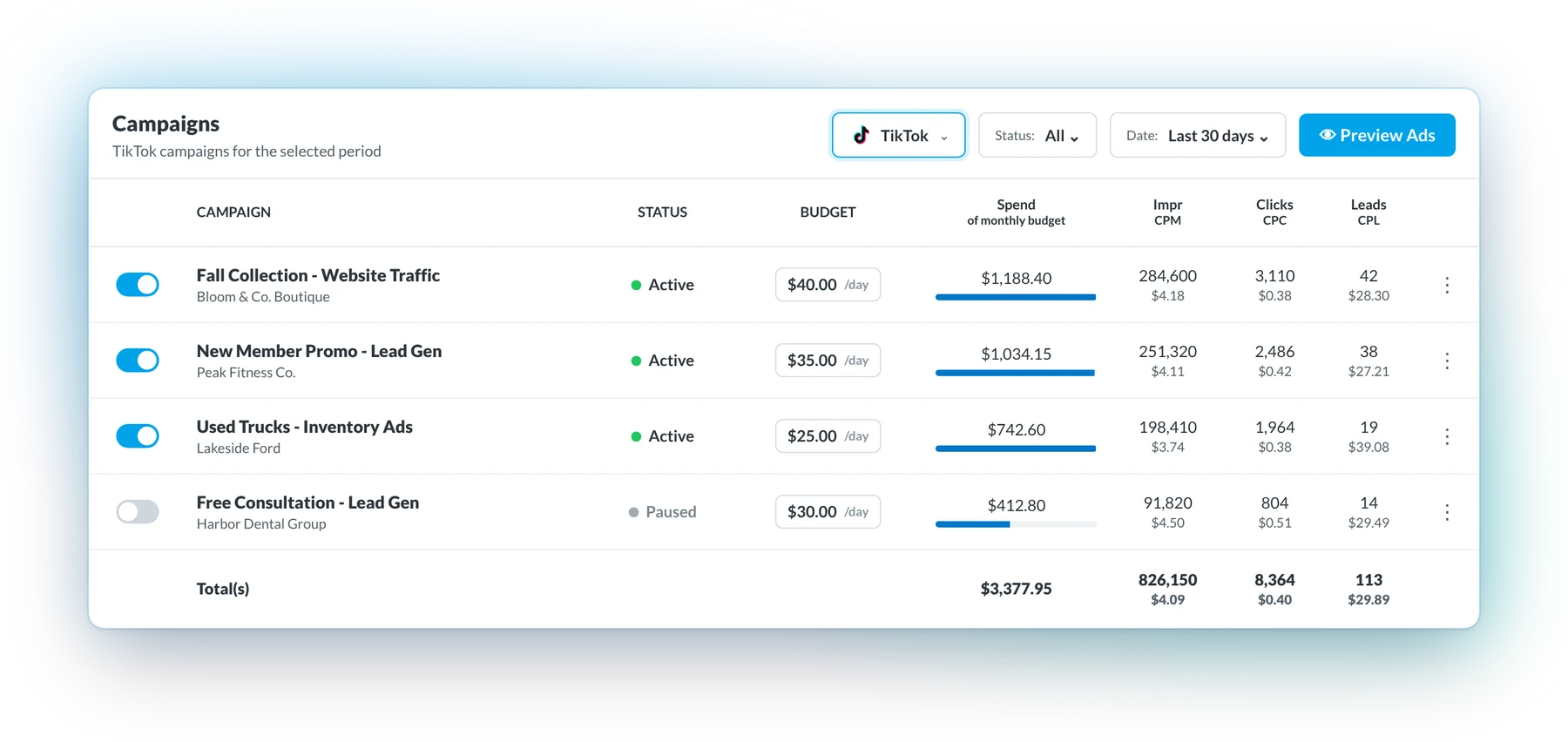
Every live campaign from every channel sits in one table, with status, budget, spend, leads and cost per lead side by side. Pause a TikTok campaign and check a Meta budget without opening a single native ad manager.
Every Channel's Campaigns in One View
Campaign management software lets you launch, monitor and adjust paid campaigns on several ad platforms from one interface. Native tools like Meta Ads Manager and Google Ads each handle one channel. Checking five of them means five logins, five layouts and five names for the same number.
BuyerBridge connects to your existing ad accounts and pulls every channel into one Campaigns table. Spend, clicks, leads and cost per lead line up in the same columns no matter where the campaign runs.
What is cross-channel campaign management?
Cross-channel campaign management means running paid campaigns on several platforms as one program instead of separate silos. Budgets, results and changes sit side by side, so a dip on Meta shows up right next to a spike on Google.

Each ad manager uses its own labels. Google Ads, for example, reports Conversions and Cost / conv.
Five Ad Managers Become One Campaign Table
Each channel you add usually means another tab to keep open. BuyerBridge pulls them together so the morning check happens in one place.
Filter by Channel, Status or Date
Narrow the table to one channel, active campaigns only, or any date range without leaving the page. The layout mirrors Meta Ads Manager on purpose, so your buyers already know how to read it.
- Pause or resume in the row. Flip the toggle and the change goes to the ad platform.
- Budget next to results. Each campaign's daily budget sits beside its spend, clicks and leads.
- See spend against budget. A bar under each spend figure shows which campaigns are running hot.
Fewer Logins, Quicker Campaign Checks
Every channel you check natively is another login, another account switch and another date range to set. Move the sliders to count what that adds up to for your team.
It isn't getting easier. In a Search Engine Land and Semrush survey of 1,306 PPC practitioners, 53% said PPC is harder than it was two years ago. Hours saved on checks go back into the work that grows accounts, which is how teams scale an agency without adding headcount.
Minutes per check covers logging in, switching to the client's account and setting the date range. Hourly rate is your blended team cost. Illustration only: your numbers depend on your accounts and team.
Send One Preview Link Instead of Twenty Screenshots
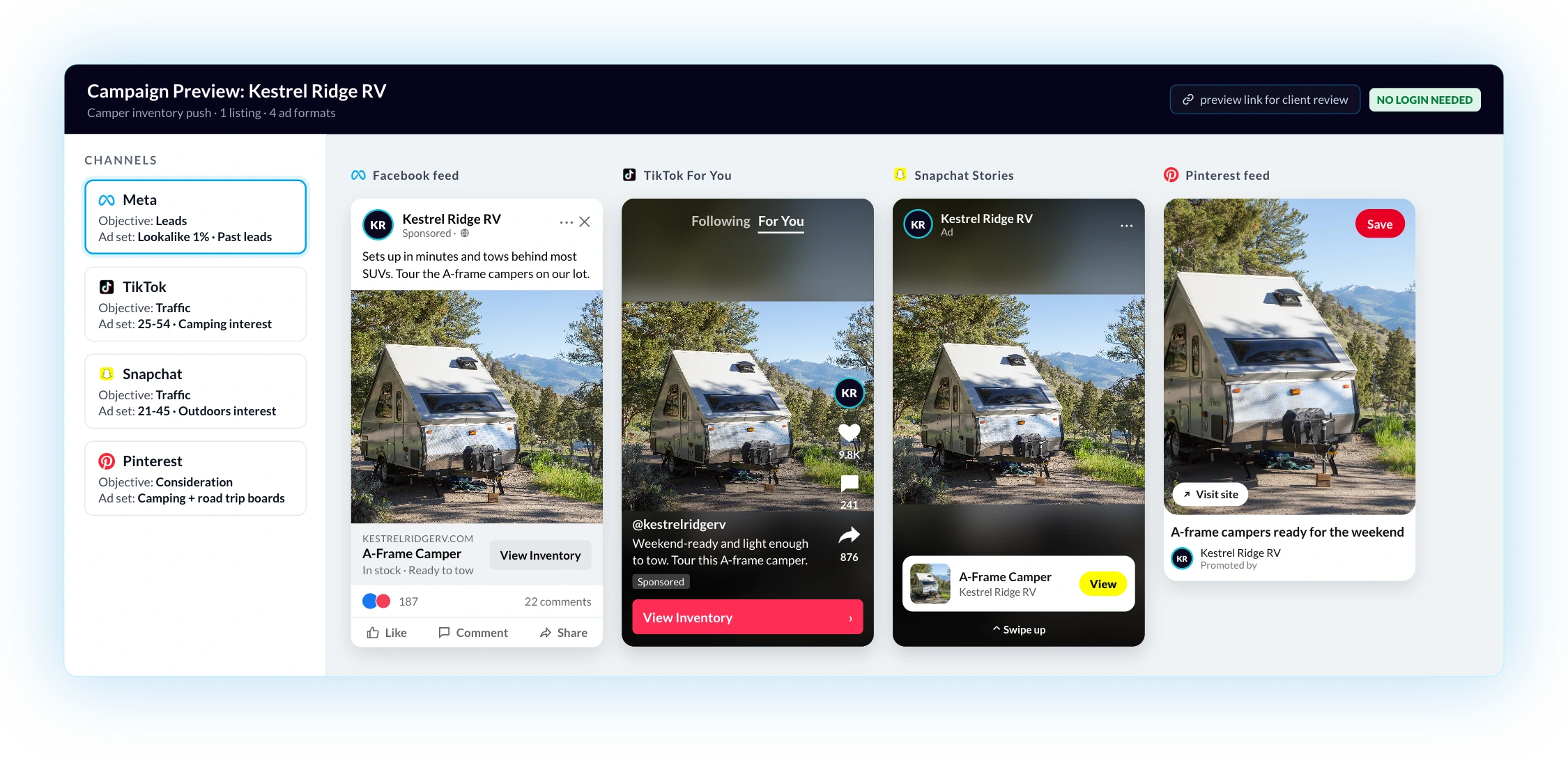
When a client wants to see campaigns before launch, send a secure preview link. One listing, every format: the link shows each channel's objective and ad set next to the ad as it will appear in feed, Stories and For You placements. Clients don't need platform access.
6 Ways BuyerBridge Simplifies Cross-Channel Campaign Management
From daily checks to client approvals, in one campaign view.
- 01
One table for every channel
Google, Meta, TikTok, Snapchat and Pinterest campaigns in the same rows and columns.
- 02
Filter in seconds
Cut the table to one channel, one status or one date range when a client calls with a question.
- 03
Budget and pacing in the same row
Each campaign's budget sits next to its spend and results, so a campaign running hot is easy to spot.
- 04
A layout your buyers know
The table mirrors Meta Ads Manager, so there's little to learn before your team is working in it.
- 05
Preview ads before launch
Share a preview link that shows every ad in its real placement. Approvals stop living in email threads.
- 06
Hand off to reporting
When it's time to share results, Report Builder pulls the same channels into one client-ready report. See a faster way to handle agency client reporting.
Multichannel Campaign Management Across Today’s Top Ad Platforms
Different platforms, different strengths. Pick a channel to see what you manage there from BuyerBridge.

Meta: Facebook and Instagram
Awareness, traffic and lead generation across Facebook and Instagram feeds, Stories and Reels.
- Lead form campaigns next to traffic campaigns
- Ad set detail under each campaign
- Ad previews in feed and Stories placements

Google: Demand in the Moment
High-intent traffic from people searching and shopping right now.
- Google campaigns in the same table as social
- Cost per lead compared across every channel
- Paused campaigns stay in view

TikTok: Discover and Entertain
Short-form video that reaches people while they scroll For You.
- TikTok spend next to Meta and Google
- Ad previews in the For You placement
- Pause or resume from the campaign row

Snapchat: Immersive Reach
Full-screen ads in Stories and Spotlight for younger audiences.
- Snapchat results in the shared columns
- Snapchat spend and leads next to every other channel
- Ad previews in Stories placements

Pinterest: Plant Ideas Early
Reach people while they plan, save ideas and compare options.
- Pinterest campaigns next to search and social
- Spend and leads in the same columns
- Ad previews in the Pinterest feed
Campaign Management Works Better When the Rest of Your Workflow Is Connected
Build ads first with multichannel marketing automation, then manage them here. Running paid media for many clients? See how BuyerBridge works as PPC management software for agencies.
Campaign Management Software FAQ
What is campaign management software?
Campaign management software lets marketers launch, monitor and adjust paid ad campaigns across several advertising platforms from one interface, instead of checking each platform’s own dashboard.
What is cross-channel campaign management?
It’s managing paid campaigns on several ad platforms from one place, with budgets, results and changes tracked side by side instead of in each platform’s own dashboard.
Which channels does BuyerBridge campaign management support?
Google, Meta (Facebook and Instagram), TikTok, Snapchat and Pinterest, all in one Campaigns table.
How does multichannel campaign management software save time?
It cuts the time spent logging into separate dashboards, switching accounts and setting date ranges. That gives account managers more time for optimization, reporting and client support.
Can it help with budget pacing?
Yes. Each campaign’s budget sits next to its spend and results, so teams can spot pacing issues early instead of finding them at month end.
How is it different from marketing automation tools?
Campaign management software focuses on monitoring, organizing and adjusting live campaigns across channels. Marketing automation tools focus on building, launching and automating campaign setup.
Can clients review campaigns before launch?
Yes. A secure preview link shows each channel’s objective, ad sets and ads in their real placements. Clients don’t need platform access to review them.
What should agencies look for in campaign management software?
Look for one view across every channel you buy on, budget and pacing visibility, ad previews for client approvals, clear reporting and support for many client accounts without extra manual work.
What is campaign management software?
Campaign management software lets you launch, watch and change ad campaigns on several platforms without logging in to each one. In BuyerBridge, every client’s campaigns sit in one table with status, budget and spend. You can pause a campaign or change a daily budget right from that view.
Run Every Paid Channel From One Campaign View
Book a 30-minute demo and we'll walk through your campaigns, your channels and how much checking you can cut.
Book a Demo