
Google Ads Automation Tools for Agencies
Launch, manage and report on Google Ads for every client you run, from 1 dashboard.
BuyerBridge handles the work around each Google campaign: onboarding the account, pacing the budget and building client reports. Google sits next to your paid social, so switching channels doesn't mean switching tools. Running ads for car dealers? See Google vehicle listing ads.
Illustrative example
What Are Google Ads Automation Tools?
Google Ads automation tools take over the manual work of building, managing and reporting on campaigns. Google already automates bidding. The hours go to everything around it: setting up each store, keeping campaigns matched to the lot and pulling numbers for every client.
For an automotive agency, that work repeats for every rooftop. BuyerBridge does it once and reuses it, for Search campaigns here and for Google Vehicle Listing Ads.
Search campaigns built for each store from a Playbook, not a blank screen.
Campaigns stay matched to what's on the lot, refreshed from the feed daily.
Keyword ideas from real search data, with match types and negatives set.
Every store in 1 dashboard and client reports in minutes.
How Much Time Is Google Ads Costing Your Team?
Most agencies aren't short on Google strategy. They're short on hours.

The same build, every store
Every rooftop starts from a blank campaign. Multiply that by your roster and the week is gone.

Spend drifts off plan
Left alone, a campaign can bid on the dealer's own name and pay for traffic the store was getting for free.

Clicks, not cars sold
Google's reports stop at impressions, clicks and cost. They never say whether a car sold.
How Do You Run a Dealer's Google Ads in BuyerBridge?
Set up the store once. After that, the daily work happens in 1 place.
 Onboard the accountConnect Google Ads, Merchant Center, Business Profile and GA4 in a guided setup.Sync the feedConnect the dealer's inventory once. Campaigns stay current as cars come and go.Launch and paceDeploy a Search Playbook, set a monthly goal and let daily budgets adjust to hit it.Prove it per VINSee which vehicles the ads influenced, tied to cars that sold.
What Runs on Autopilot After Launch?
Google automates bids. BuyerBridge handles the daily jobs your team would otherwise do by hand.
Budgets pace themselves
Turn on auto-pacing and BuyerBridge adjusts daily budgets toward the monthly goal. Nobody does the math on the 25th.
Campaigns follow the lot
The inventory feed refreshes daily. Sold cars drop out of the ads and new arrivals show up without a rebuild.

Problems flag themselves
BuyerBridge watches Google Ads, GA4 and Merchant Center for tracking, budget and feed issues. A support ticket is 1 click away.
Reports send on schedule
Build a white-label report once and it goes to the client every week or month.

Setup builds the extras
Onboarding writes the call, sitelink, callout and snippet assets for each new account.

Sold cars get counted
When an advertised VIN leaves the feed, it counts as an influenced sale with its cost attached.
Does Google Ads Management Software Manage Campaigns, or Only Launch Them?
Both. Launch is the easy part to see. What decides whether an account performs is the 8 weeks after: which search terms waste money, which keywords deserve their own ad group and whether the budget is buying the traffic you wanted.
Keywords with match types you control
Run all 3 match types where the account is actively managed. Hands-off accounts default to phrase and exact, since broad match left alone spends on parts, service and recall searches.
Negative keywords at 2 levels
Campaign negatives block the universal waste: free, jobs, recall, salvage. Ad group negatives send a model search to the ad group built for that model.
Responsive search ads, fully built
1 responsive search ad per ad group with every field filled: up to 15 headlines and 4 descriptions, written for the dealer, the city and the models they stock.
Impression share next to spend
See impression share beside spend. A campaign losing share to budget shows up before the month closes, not after.
Which Google Search Campaigns Can You Launch From Playbooks?
5 Search Playbooks built for car dealers. Each one is set to optimize for account-level conversions: calls, form leads, store visits and contacts.
How Do Agencies Manage Google Ads for Multiple Dealerships?
From 1 view, without logging into Google 1 client at a time.

Every account in 1 view
Filter by campaign, ad group, ad, status and date range across all your dealers.

Make changes live
Pause campaigns, edit daily budgets and preview the ads running without opening Google Ads.
Faster client approvals
Send a preview link. Clients don't need Google Ads access and nobody trades screenshots.

Google next to social
Google runs in the same dashboard as Meta, TikTok, Snapchat, Pinterest and Reddit.
How Long Does It Take to Onboard a New Google Ads Account?
By hand, it's days of setup per rooftop. On BuyerBridge, most new accounts are live in about a week.
- Get access to the Google Ads account
- Set up and verify Merchant Center
- Build and submit the vehicle feed
- Link GA4 and build conversion tracking
- Set account-level conversion goals
- Repeat for the next store
- Ad account created or connected under your MCC
- Merchant Center linked, feed syncing daily
- GA4 linked, conversions imported to Google Ads
- Call, sitelink and callout assets generated
- Authenticated once per organization
- Up to 4 hours of support from our team
What Should a Google Ads Reporting Tool Show Clients?
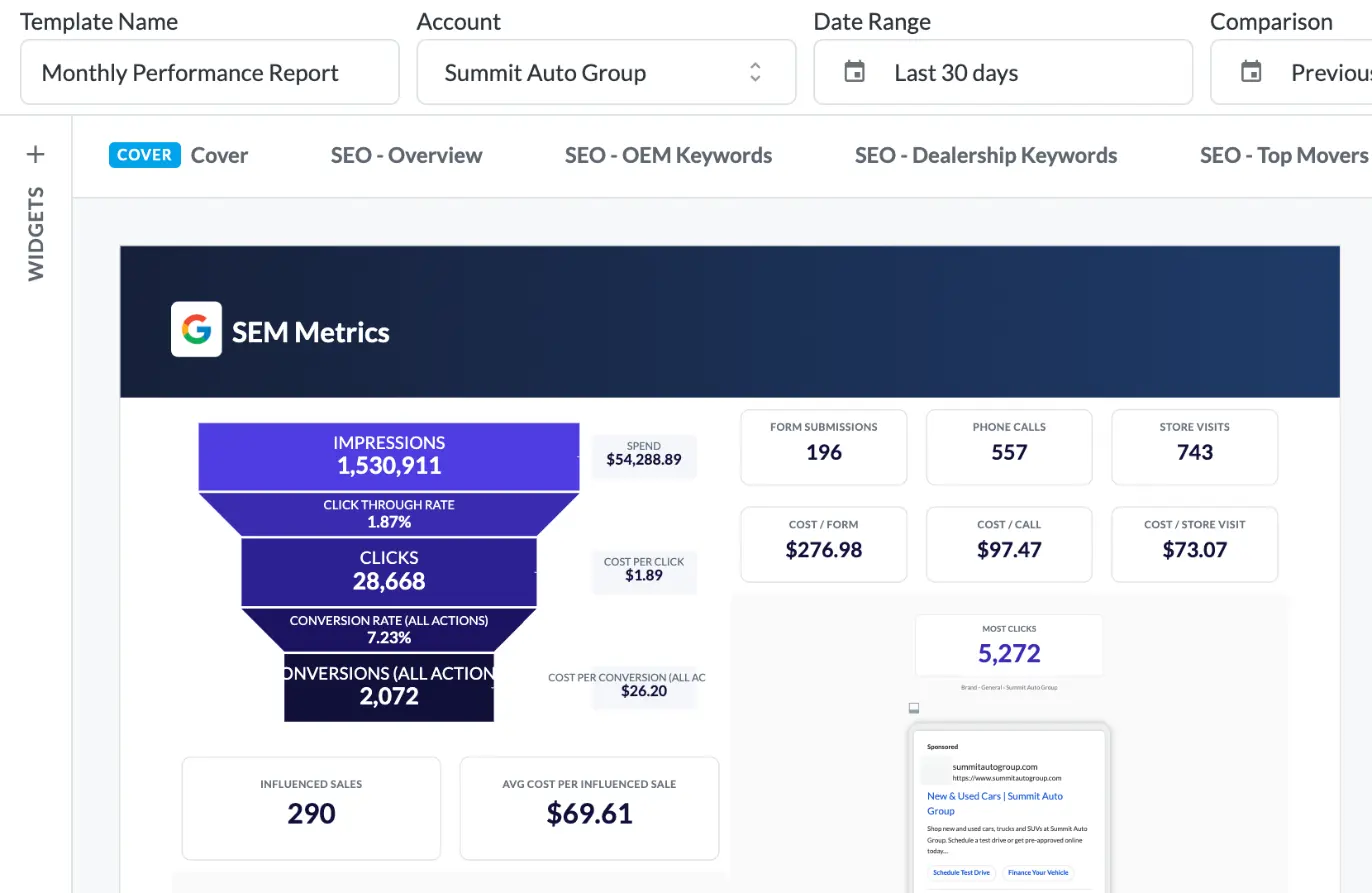
The full funnel, from impressions to cost per lead. For a dealer, it also has to tie spend to the cars on the lot.
- Spend, clicks, CTR and days advertised for every VIN
- Influenced sales and cost per influenced sale for Google
- A status on every vehicle: still for sale, or sold
- White-labeled reports that send on a schedule
Illustrative numbers.
Report builder
Drag in charts, funnels and ad previews. Brand it as your agency and schedule it to send itself.
Dashboard KPIs
Impressions to cost per lead, with period comparisons for 1 account or all of them.
How Do You Keep Google Ad Spend on Pace Across Accounts?
Set a monthly goal for each account. When one drifts, BuyerBridge suggests a daily adjustment, or auto-pacing makes it for you.
- Pacing and goal for every account and campaign
- Projected spend with a suggested daily budget
- Off-pace and overspending accounts flagged first
Fake accounts, illustrative numbers. Day 15 of 30.
Running Vehicle Listing Ads?
VLAs, product sets and Merchant Center feed checks have their own page.
What Does Google Ads Automation Look Like in BuyerBridge?
A 4-minute walkthrough, from the inventory feed to a live campaign to the report you hand the client.
- Every channel in 1 dashboard, Google included
- A Google campaign launched in a few guided steps
- Budget, landing page and location set in 1 pass
- Reporting down to spend per vehicle
Google Ads Automation FAQ
Do I need Google Ads automation software, or can I just use Google Ads?
Google Ads automates bidding, but not the work around each campaign: setting up every store, keeping campaigns matched to inventory and reporting across accounts. Automation software handles that layer. BuyerBridge is built for automotive, so an agency can run Google for every rooftop from 1 place instead of rebuilding each account by hand.
What's the difference between Google Ads automation and auto-bidding?
Auto-bidding is what Google does inside the platform, adjusting bids toward a goal like Maximize Conversions. It doesn’t build campaigns or keep them matched to inventory. Google Ads automation software handles that workflow: onboarding, syncing campaigns to the feed, pacing budgets and reporting.
What should a Google Ads reporting tool include?
The full funnel: impressions, CTR, clicks, conversion rate, leads and cost per lead, compared with the last period. For dealers, it should also tie spend to inventory, with spend per vehicle and which cars the ads influenced. BuyerBridge builds these reports white-labeled and can send them on a schedule.
What KPIs should be in a Google Ads report for most clients?
Show the funnel, not just clicks: impressions, click-through rate, clicks, conversion rate, leads and cost per lead, with the current period next to the last. For a dealership, add spend per vehicle and influenced sales.
How do you manage multiple Google Ads accounts in one place?
BuyerBridge puts every Google campaign in 1 dashboard with budget, status and performance in view, next to your paid social channels. You can pause a campaign, edit a daily budget and share a preview link for client approval from that screen.
What Google Search campaigns can agencies launch for car dealers?
BuyerBridge has 5 Search Playbooks for automotive: a Multi-Campaign Suite, Dealership Branding, OEM and Models Branding, Generic Automotive and Automotive Service. Each one optimizes for account-level conversions like calls, form leads, store visits and contacts. Vehicle Listing Ads have their own Playbook, covered on the Google Vehicle Listing Ads page.
How quickly can you launch Google Ads for a new dealership?
Launching means connecting the ad account, Business Profile, Google Analytics, conversion tracking and the inventory feed before the first campaign runs. By hand, that’s days per store. On BuyerBridge the setup is guided and reused across rooftops, so most partners have a new account live in about a week.
How do I reduce Google Ads setup errors when onboarding new clients?
Most errors come from missed steps, like a disconnected conversion tag, a feed that fails to sync or a Merchant Center disapproval no one caught. BuyerBridge onboards accounts through a guided checklist, then flags issues across Google Ads, GA4 and Merchant Center so they’re fixed before they cost impressions.
How do you prove Google Ads influenced car sales?
When a VIN that had spend and engagement drops out of the inventory feed, BuyerBridge counts it as an influenced sale. The Vehicle Advertising Report shows this VIN by VIN, with cost per influenced sale, so you report cars, not just clicks.
Can agencies offer white label Google Ads management with BuyerBridge?
Yes. Agencies run each client’s Google Ads in BuyerBridge, and on the Plus and Elite plans the dashboard and Google Ads reports carry the agency’s brand instead of BuyerBridge. That makes white label Google Ads management possible without a separate reporting tool. Branded reports can send to each client every week or month.
Run Every Dealer's Google Ads From 1 Place
Book a 30-minute demo and we'll walk through Google on an account like yours.